Payment speed
How fast each customer really pays, worked out from their own past bills: fast, normal, slow or very slow.
Your accounts, collections and sales - clear on any phone, read by AI and machine learning. OpenBahi learns from your own books to show who to collect from, who to stop and what cash is coming, and sends new invoice PDFs and overdue reminders on WhatsApp after every successful sync.
Read-only connection Updates every hour WhatsApp delivery
Statistical and logic models, built on each firm's own history, turn your records into decisions. They tell you what to do; the decision stays yours.
How fast each customer really pays, worked out from their own past bills: fast, normal, slow or very slow.
OK, new, watch, hold or recover for every party, with the oldest unpaid bill and the days since anything came in.
What is likely to come in over the next 2, 4 and 8 weeks, based on each customer's habit rather than a guess.
Where each broker stands: business brought, money stuck under him and how his parties pay.
Models learn from your own books only, using statistical and logic methods. Screens shown on this site use sample figures.
OpenBahi turns accounting records into practical answers: who owes you, which client has gone quiet, how sales are moving and what each dalal is bringing in.
Customers who owe you
Business each broker brought in this year
Today's invoices and receipts
Who is buying, and who has gone quiet
This year against the same months last year
After a successful sync, OpenBahi sends each new invoice PDF to the customer's confirmed WhatsApp number. For overdue accounts, you decide who receives a polite reminder and how often.
Setup is done once. After that, OpenBahi keeps the dashboard current and turns new invoices and overdue balances into timely customer communication.
Use your email and choose a simple password. Open the verification email and your account is ready.
From your profile, create a one-time code for the Windows sync app. No support call or database password is needed.
For SoftTrade, the app copies and reads the required files, sending only new or changed data during the day. For Tally, it asks Tally for the books through its XML port while Tally is open. It never writes to either.
New invoice PDFs go to confirmed WhatsApp numbers after sync. From the dashboard, choose which overdue customers should receive scheduled reminders.
No. OpenBahi copies the required files into a temporary folder and reads that copy. It never writes into your live books.
OpenBahi analyses your own books with statistical and logic models: how fast each customer pays, a credit status for every party with the reason behind it, a cash forecast for the coming weeks and a status for each dalal. They point out what needs attention; you decide what to do.
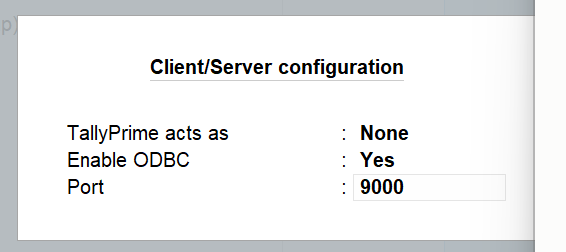
Yes, with TallyPrime. A small Windows app on the PC where Tally runs reads your books through Tally's own XML port and never writes to Tally. Turn the port on once in Tally: Gateway of Tally > F1 (Help) > Settings > Connectivity > Client/Server configuration, then set Enable ODBC to Yes and Port to 9000 (leave “TallyPrime acts as” on None). Tally must be open on that PC for the hourly sync. Several companies in one Tally can each have their own dashboard from one install, and dalal figures depend on the broker name being entered on invoices in Tally.
The computer needs to be on for a sync to run. If it misses a scheduled time, Windows starts the sync when the computer becomes available again.
Yes. The dashboard works in a browser on phones and computers, and can be added to your phone's home screen for quick access.
The current sync app checks every hour from 9:00 in the morning to 9:00 in the evening. When the books have changed, the dashboard is rebuilt with the latest data.
Yes. After a successful sync, OpenBahi sends each new invoice PDF to the customer's confirmed WhatsApp number. If a number has not been confirmed, the invoice comes to you so it can be checked and forwarded.
Yes. Reminders start off for every customer. You choose the customers and select once overdue, every 7 days, every 15 days or monthly. OpenBahi attaches the current statement, skips Sundays, pauses after a payment and stops when nothing is overdue.